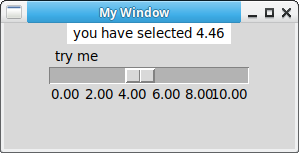
You can add a scale or slider to your window. You may be familiar with this from volume control. It can be a horizontal slider or a vertical slider.
A scale has a minimum and maximum that you can define. You can set a callback function that's called if you move the slider.
Practice now: Test your Python skills with interactive challenges
scale
tkinter scale
The tkinter program below creates a scale. You can define the minimum (from_) and maximum (to). To change its orientation, change the orient parameter.
The tickinterval is something you want to set, if it's different than one. You can also set its length.
#!/usr/bin/env python
# -*- coding: utf-8 -*-

import tkinter as tk

window = tk.Tk()
window.title('My Window')
window.geometry('500x300')

l = tk.Label(window, bg='white', fg='black', width=20, text='empty')
l.pack()

def print_selection(v):
    l.config(text='you have selected ' + v)

s = tk.Scale(window, label='try me', from_=0, to=10, orient=tk.HORIZONTAL, length=200, showvalue=0,tickinterval=2, resolution=0.01, command=print_selection)
s.pack()

window.mainloop()