Tabs can be added to a QTabWidget. The QTabWidget can be added to a layout and the layout to the window.
There can be any amount of tabs. The example below shows tabs added ta qt window.
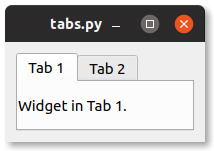
image: tabs showing in a pyqt window.
Practice now: Test your Python skills with interactive challenges
Tab example
PyQt tabs example
Run the code below to see a tab widget in a pyqt window. Navigating between the tabs shows the widgets added to the tab.
To add a tab to a QTabWidget, call the method .addTab().
from PyQt5.QtCore import *
from PyQt5.QtWidgets import *
import sys

class Window(QWidget):
    def __init__(self):
        QWidget.__init__(self)
        layout = QGridLayout()
        self.setLayout(layout)
        label1 = QLabel("Widget in Tab 1.")
        label2 = QLabel("Widget in Tab 2.")
        tabwidget = QTabWidget()
        tabwidget.addTab(label1, "Tab 1")
        tabwidget.addTab(label2, "Tab 2")
        layout.addWidget(tabwidget, 0, 0)

app = QApplication(sys.argv)
screen = Window()
screen.show()
sys.exit(app.exec_())