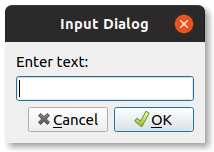
Input dialog in PyQt is supported out of the box (QInputDialog). This has an input text, an ok and cancel button.
In this article you'll see that works in PyQt. As shown in the screenshot
Practice now: Test your Python skills with interactive challenges
Input Dialog
Example
The code below creates a PyQt input dialog. After you click the button, you can enter some text. The text is shown as label.
The dialog is created in the method showDialog and it's just a few lines. Input dialig is part of PyQt5.QtWidgets.
from PyQt5.QtWidgets import (QWidget, QPushButton, , QInputDialog, QApplication, QLabel)
import sys

class Example(QWidget):

    def __init__(self):
        super().__init__()
        self.initUI()

    def initUI(self):
        # Add button
        self.btn = QPushButton('Show Input Dialog', self)
        self.btn.move(30, 20)
        self.btn.clicked.connect(self.showDialog)

    # Add label
        self.le = QLabel(self)
    self.le.move(30, 62)
        self.le.resize(400,22)

        self.setGeometry(300, 300, 290, 150)
    self.setWindowTitle('Input dialog')
        self.show()


    def showDialog(self):
    text, ok = QInputDialog.getText(self, 'Input Dialog', 'Enter text:')
    if ok:
            self.le.setText(str(text))

if __name__ == '__main__':
    app = QApplication(sys.argv)
    ex = Example()
    sys.exit(app.exec_())
Practice now: Test your Python skills with interactive challenges